
A remote-access platform that fits in one folder.
One core holds your credentials, host trust, audit trail and sync. SSH, SFTP and a local shell are built in. VNC, Telnet, Docker and the protocols you write yourself plug into the same core as confined processes, and inherit all of it.
- Version
- 1.5.0, released 2026-11-04
- Platforms
- Windows 10/11, Linux x86-64
- Installation
- None. Unpack and run
- Plugin API
- 1.0, frozen contract
- License
- GPLv3, source on GitHub
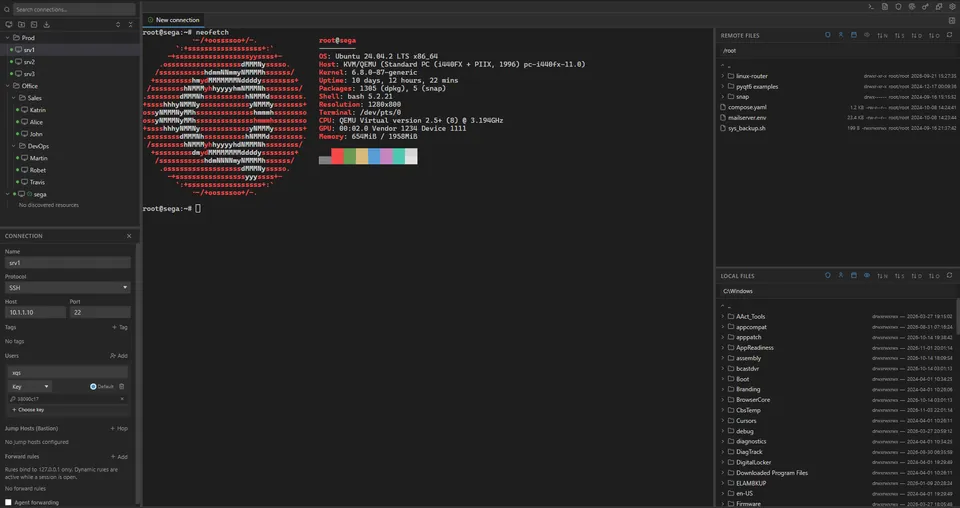
The real application interface with demo data. Double-click a connection to open a session, browse files, open Keys, Known Hosts, Plugins or Settings. Changes are refused. Open full screen
One core, every protocol
Most tools are built around one protocol and keep their own credentials, trust decisions and history. xQuakShell is built the other way round: a core of shared services, and protocols that attach to it. Plugins reach the core only through the capability gate; built-in protocols are part of it.
Select a protocol, the gate, the core or a service.
Official plugin, protocol
VNC
A remote desktop in an embedded noVNC viewer, added by a plugin. Its connections sit in the same tree, take their password from the same vault and sync like SSH ones.
The server's identity is checked by the core through Trusted Peers, so a plugin never decides whom to trust.
Built into the core
SSH
Terminal sessions with jump chains, IPv4 and IPv6, local, remote and dynamic forwarding, and agent forwarding with every signature confirmed.
Keys and passwords come from the vault, host keys are verified strictly, and submitted commands go to the audit log when you enable it.
Official plugin, discovery
Docker
Containers, images, volumes and networks appear under an SSH connection in the tree, with start, stop and the other actions on each node, and logs and a container console in tabs of their own.
It works through the SSH session you authenticated and declares exactly one command, docker system dial-stdio. Anything else is refused and recorded.
Official plugin, protocol
Telnet
Terminal sessions with optional auto-login, rendered by the same terminal as SSH: tabs, tiles and search across scrollback work unchanged.
The plugin reads only the host, port and password its manifest names, and secrets never reach its logs.
Built into the core
SFTP
A file manager beside the terminal, over the same verified connection. Parallel transfers with a limit, a speed cap and a rule for existing files; edit a remote file in your own editor and it uploads on save.
Built into the core
Local shell
PowerShell, cmd, bash, zsh or fish on your own machine, as a tab like any other.
It is deliberately outside the platform's reach: no plugin can open one, nothing is saved, and keystrokes are not recorded. The audit log notes only that a shell was opened.
Third party
Your plugin
A plugin can add any of these, each behind the grant it declares:
- Connection protocol
- a terminal tab or an embedded view, with its own fields in the connection editor
- Discovery
- a tree of nodes with actions under a connection
- Tabs, dialogs, panels
- its own terminal or log tabs, forms, node details
- Commands
- palette entries, status bar items, a sidebar panel
- SSH authentication
- keyboard-interactive or public-key steps, with your consent
- Tunnels
- a new kind of forwarding rule, with your consent
Plugin boundary
Capability gate
Every call a plugin makes passes here and is checked against its manifest: files, hosts, vault fields, commands. What it did not declare is refused before it runs and written to the audit log.
Behind the gate, each plugin is a separate process with memory and handle limits, confined by AppContainer on Windows or Landlock on Linux. Bundles are signed, and risky grants need your consent.
The platform
Core
One process owns the vault, every trust decision, the audit log, sync and the workspace. Protocols attach to it; none of them holds a copy of your credentials or decides on its own whom to trust.
Shared service
Vault
Connections, keys, passwords and protocol fields in one age + scrypt encrypted file. A plugin reads only the fields its manifest names, for the session it owns.
Shared service
Trust
Strict host key verification for SSH and trust on first use for every other protocol, both decided by the core. A changed identity stops the connection and asks you.
Shared service
Audit log
Command history from SSH sessions and a record of what the application did, including every refused plugin call. Searchable, local, password-like input masked.
Shared service
Sync
Connections of every protocol move between your devices and team vaults through your own server, encrypted and signed on the device. Plugins can declare files of their own to sync.
Shared service
Workspace
Tabs, tiles, the connection tree, search across every terminal, typing into several at once and the command palette. A plugin session is a tab like any other.
Shared service
Language
The interface language reaches plugins too: each is told what the user reads and may ship a catalog of its own.
Why xQuakShell
| Concern | Common approach | xQuakShell |
|---|---|---|
| Scope | One tool per protocol, each with its own credentials and history | One workspace, one vault and one audit trail for every protocol. |
| Extensions | In-process libraries with full access to the app | Separate OS processes, capability-gated, resource-limited, OS-confined on Windows and Linux. |
| New protocols | Wait for the vendor's roadmap | Write a plugin against a documented, frozen API, or install one. |
| Installation | Installer, registry keys, profile folders | One folder. Vault, audit log and plugins live next to the executable. |
| Secrets at rest | Config files, OS keychain, sometimes plaintext | One age + scrypt vault behind a master password, with a one-time recovery key. |
| Host trust | Accepted on first prompt, sometimes automatically | Strict verification, no silent accept, for SSH and for every plugin protocol. |
| Sync | Vendor cloud that holds or can read your data | Your own server. Encrypted and signed on the device; the server is treated as hostile. |
Built into the core
Windows and Linux archives, checksummed. No installer, no account.